Use the AI playground to test a generation
Run a real prompt in a sandbox to compare providers, models and credit cost before relying on AI day to day.
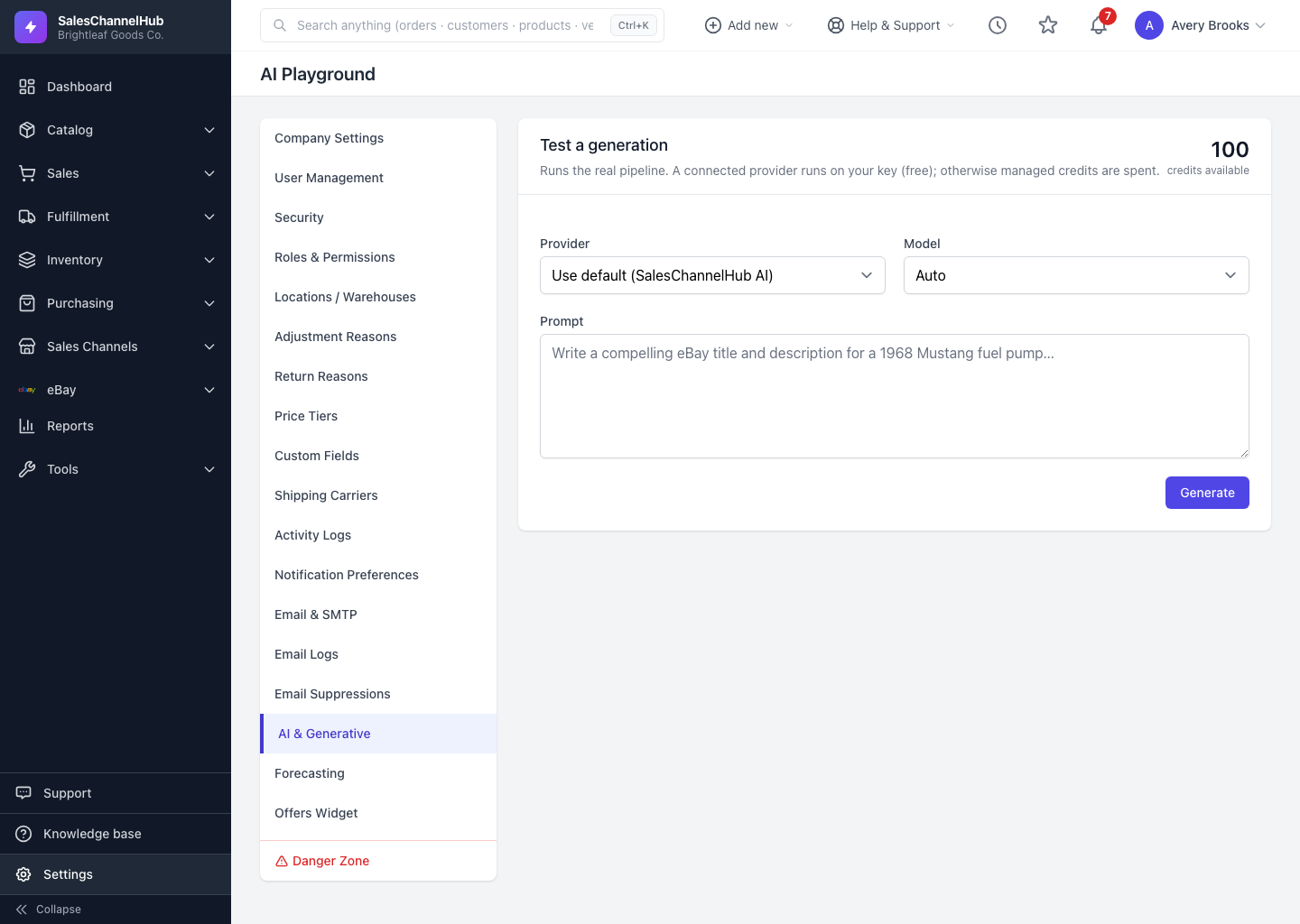
The playground is a sandbox for trying prompts without touching a real product or message. It runs the same pipeline the rest of the app uses, so what you see here is what you'll get everywhere.
How do I run a test?
- From the AI & Generative page click Open playground.
- Leave Provider on Use default, or pick a specific managed or connected provider. Each option notes whether it uses credits or runs free on your key.
- Leave Model on Auto, or choose one.
- Type a Prompt, for example a title and description for a homeware item, then click Generate.
How do I read the result?
A badge shows whether it ran on your key · no charge or on managed credits. Below the text you'll see Input tokens, Output tokens, Credits charged and Balance remaining.
Tip. Compare a cheap fast model against a stronger one on the same prompt here before deciding which to rely on every day.
Common questions
How do I open the playground?
Click Open playground in the top right of the AI & Generative page. It opens at Settings → AI & Generative → playground.
Does a playground test spend credits?
It does if it runs on managed credits, the same as a real generation. Running on a connected provider key costs no credits. The result shows exactly what was charged.
Does the playground change any of my records?
No. It only generates text for you to read. Nothing is written to a product, order or message.