Tracking stock across multiple locations
Stock is tracked per location, so a SKU in two warehouses has two independent counts. The summary cards roll every site into one total.
Stock is tracked per location, not just per SKU. Hold an item in two warehouses and you have two independent counts, each with its own on-hand, allocated and reorder point.
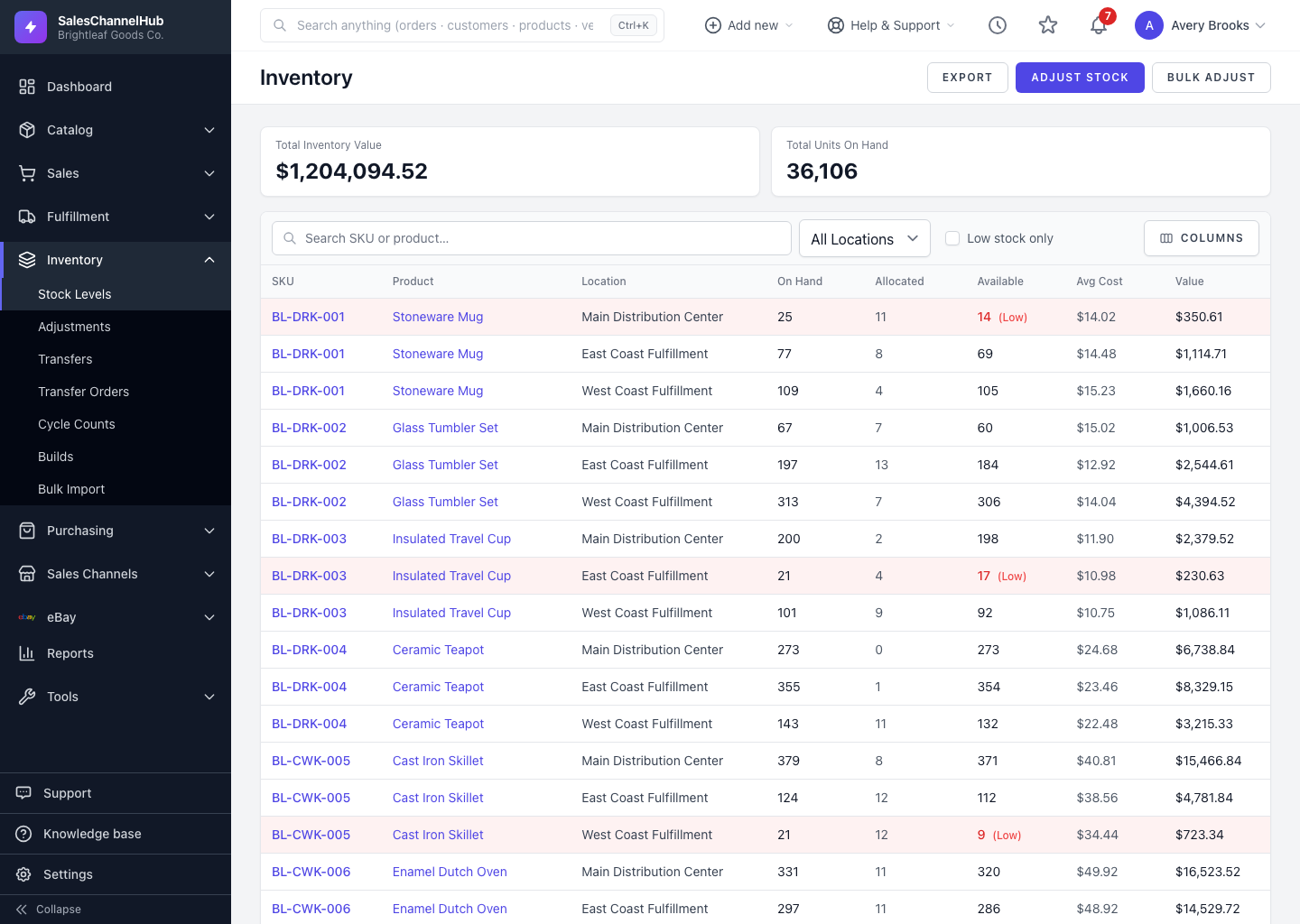
What does this mean on the list?
- A SKU stored in two sites appears as two rows, one per location.
- Each row's Available and low-stock flag are judged for that location alone.
- The summary cards at the top roll every location into a single total value and unit count.
How do I work one warehouse at a time?
- Use the Location filter to focus on one site.
- Adjustments and transfers always target a specific location, so you correct the right shelf.
- Move stock between sites with a quick transfer or a transfer order.
Tip. A SKU can read healthy overall yet be low at one site. Filter by location before reordering so you restock where the gap actually is.
Common questions
Do the summary cards show all locations or just one?
The Total Inventory Value and Total Units On Hand cards roll up every location. Apply the Location filter to narrow the list to a single site.
Can the same SKU be low at one site but not another?
Yes. Each location has its own Available and reorder point, so a SKU can be flagged low in one warehouse while reading healthy in another.
Was this article helpful?