Read the purchase order detail page
The PO detail page shows the order's status, line items, receiving progress, vendor info and audit trail, with next actions in the sidebar.
The PO detail page is mission control for a single order: its status, its lines, what's been received, and the actions you can take next.
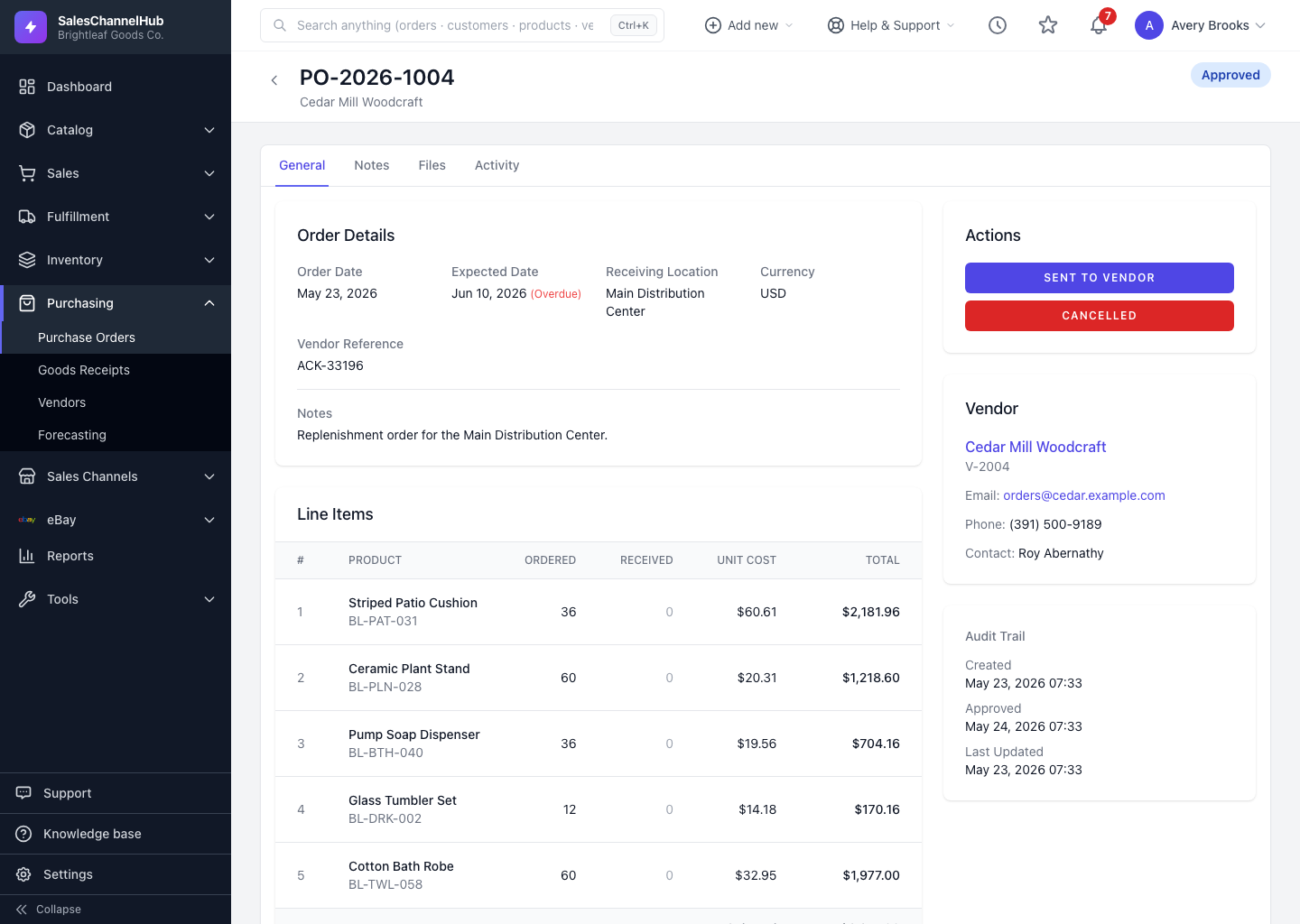
What's on the page?
- A status badge at the top, plus an Edit button while the PO can still be edited.
- Order Details — dates, receiving location, currency and vendor reference. An overdue expected date is flagged.
- Line Items showing Ordered vs Received quantities, unit cost and totals.
- An Actions sidebar listing the status moves you can make next.
- Vendor details, a Receiving Progress bar once the order is in flight, and an Audit Trail of who created and approved it.
What can I do from here?
- Move the order through its workflow using the buttons in Actions.
- Receive goods once the PO has been sent, when a Receive Goods section appears.
- Review past receipts under Receipt History.
Tip. The receiving progress bar and the Received / Remaining counts in the sidebar are the fastest way to see how much of an order is still outstanding.
Was this article helpful?