Triggers, conditions and actions explained
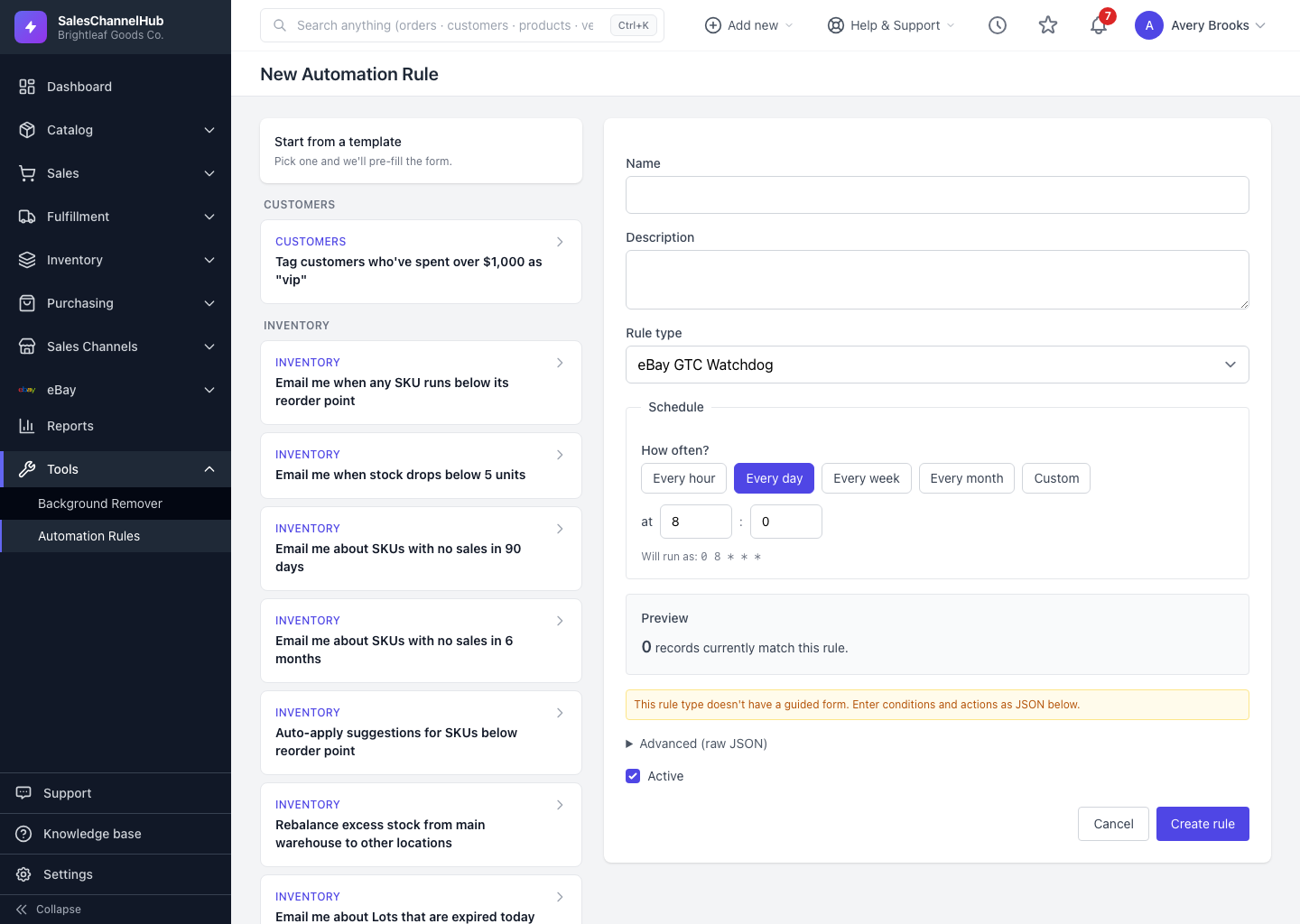
Every rule has three parts: when it runs (the schedule), what it looks for (conditions), and what it does (the action).
Every automation rule is built from three ideas: when it runs, which records qualify, and what it does to them. Once those click, the whole feature makes sense.
What are the three parts?
- Trigger (the schedule) — this is when the rule runs. You set it under Schedule using the How often? chips: Every hour, Every day, Every week, Every month or Custom. The rule wakes on schedule, looks at your data and acts.
- Conditions — the filters that decide which records qualify. For a Low Stock Alert you might set a quantity threshold and limit it to certain locations. Leave a condition blank and the rule applies its default, such as each SKU's own reorder point.
- Actions — what the rule does to each matching record. Alert rules send a notification; action rules change data, like cancelling a stale order. Actions are fixed per rule type, so there's nothing to wire up.
How do multiple conditions combine?
With AND. A record must satisfy every condition you set, so the more you add, the fewer records match. Use the Preview panel to watch the count change as you tighten or loosen them.
Tip. The rule type you pick controls which conditions and actions are even available. Choosing the right type first saves you fighting the form afterwards.
Was this article helpful?