Understand Channel Listings
Channel Listings is one page showing every listing you run across all your connected sales channels, in a single list.
Channel Listings is one page showing every listing you run across all your connected sales channels. Instead of jumping between eBay, your online store and other marketplaces, it pulls each platform's listings into a single list you can browse, search and check at a glance.
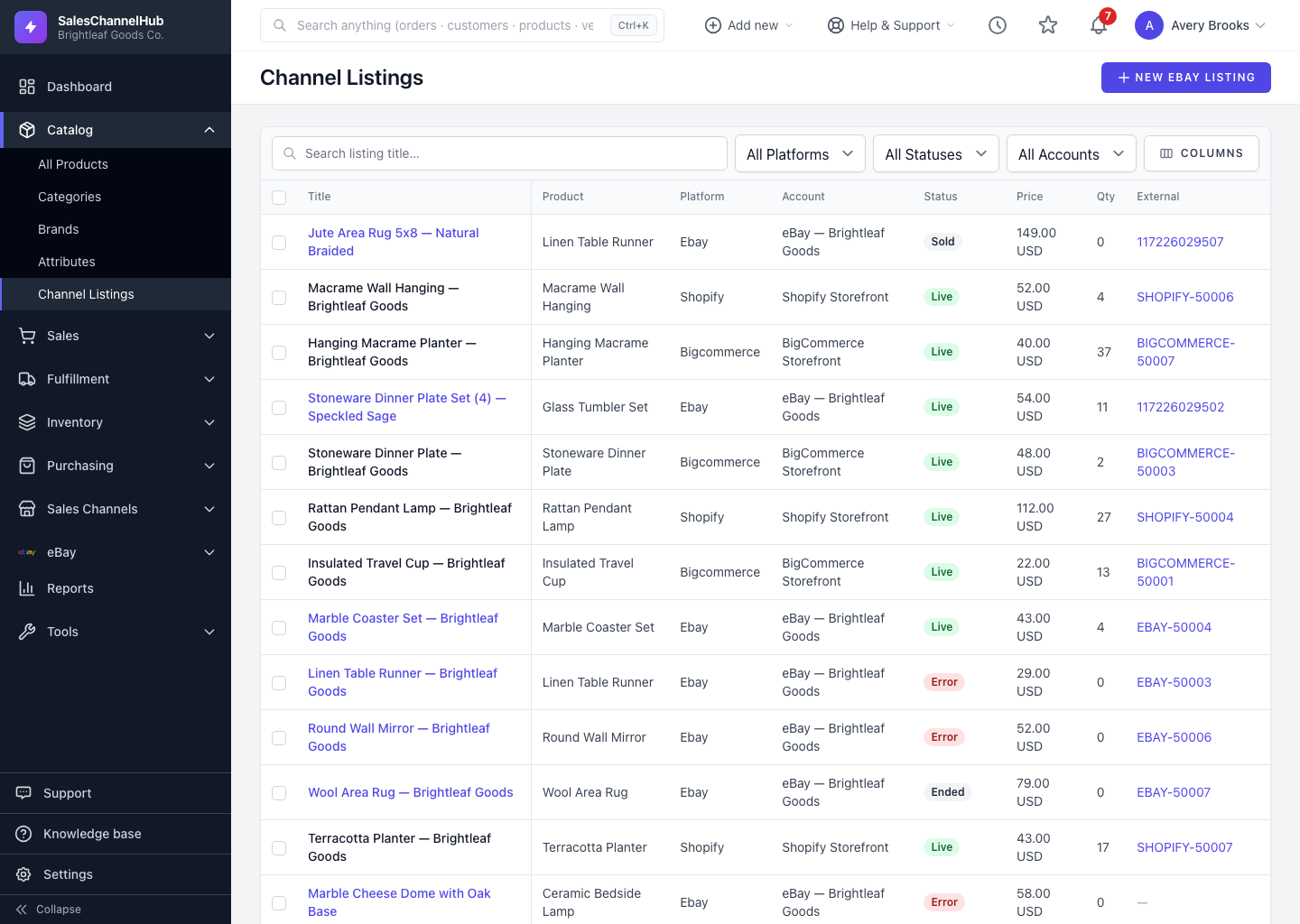
What's on the page?
- Listings across eBay, Shopify, Amazon, WooCommerce, BigCommerce and Etsy, shown together.
- Columns for Title, the linked Product, Platform, the connected Account, Status, Price, Qty and the listing's External ID. An Updated column is available too.
- A filter bar to narrow by platform, status or account, plus a title search.
The listings reflect the last sync from each platform, so what you see is close to what buyers see. To work on a single eBay listing, click its title to open the full record.
Tip. Find this page in the sidebar under Catalog → Channel Listings. Viewing it needs the integrations permission, so anyone who can see your integrations can browse listings here.
Was this article helpful?