Read the accounts receivable snapshot
The Accounts Receivable card shows what a customer owes, their available credit, days overdue and an aging breakdown.
The Accounts Receivable card on the 360 view tells you what a customer owes and how overdue it is. Use it to decide whether to extend more credit or chase a balance.
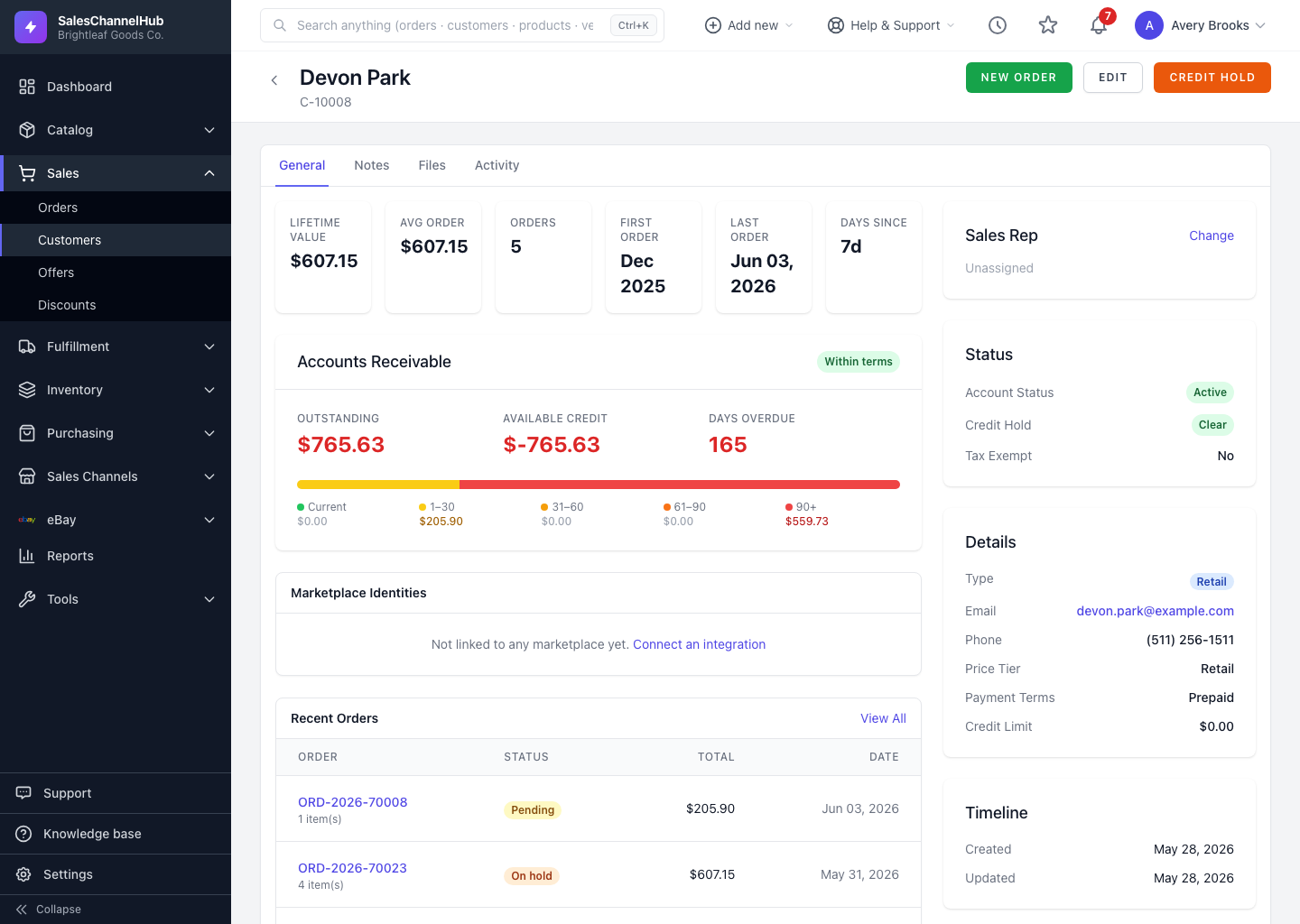
What does each figure mean?
| Figure | What it tells you |
|---|---|
| Outstanding | Total unpaid balance across the customer's invoiced orders. |
| Available Credit | Credit limit minus what's outstanding. Negative (shown red) means over the limit; a dash means no limit is set. |
| Days Overdue | How many days past terms the oldest unpaid amount is. |
| Aging bar | Splits the balance into Current, 1–30, 31–60, 61–90 and 90+ day buckets. |
| Status badge | Within terms, Near credit limit, Over credit limit or Credit hold. |
What if the bar leans toward the old buckets?
A balance weighted into the 60+ buckets is stale debt. Consider placing the account on credit hold until they pay it down.
Tip. Available Credit only does its job once a credit limit is set. With no limit it shows a dash, and nothing flags an account as over-extended.
Was this article helpful?