Understand listing profiles
Profiles are reusable bundles of listing settings. There are four types: master, shipping, return and payment.
Profiles are reusable bundles of settings you apply to listings, so you don't re-enter the same shipping, return and payment rules every time. There are four types.
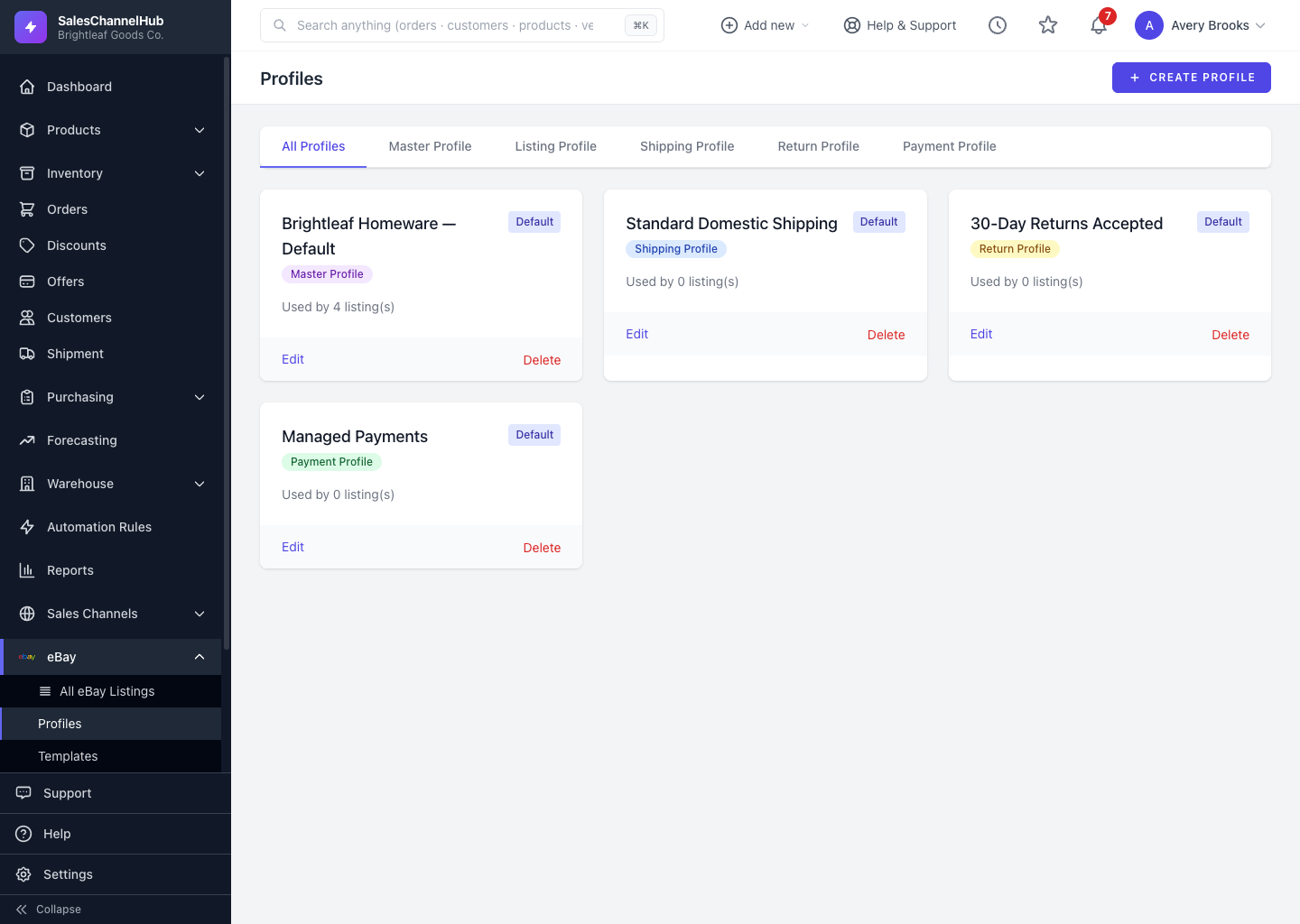
What are the four profile types?
- Master Profile — ties a shipping, return and payment profile together, plus a default category, condition and duration.
- Shipping Profile — your delivery options and costs.
- Return Profile — how you handle returns.
- Payment Profile — accepted payment settings.
Where do I find them?
Open eBay → Profiles and use the tabs (All Profiles, plus one per type) to filter. Each card shows whether it's the Default and how many listings use it.
Tip. Build one Master Profile per kind of item you sell, say small homeware and bulky garden goods, and apply it in a single click.
Common questions
Do eBay profiles replace eBay business policies?
They work alongside them. Profiles are SalesChannelHub's reusable listing defaults. eBay business policies are pulled in from your eBay account under Settings, and you can pick them by name on a listing. Use whichever fits how you sell.
What's a master profile for?
It bundles a shipping, return and payment profile plus default category, condition and duration into one pick, so a new listing inherits a full set of settings in a single step.