Understand demand forecasting and replenishment
Forecasting reads your paid-order history each night and suggests a reorder point and quantity for every SKU before it runs low.
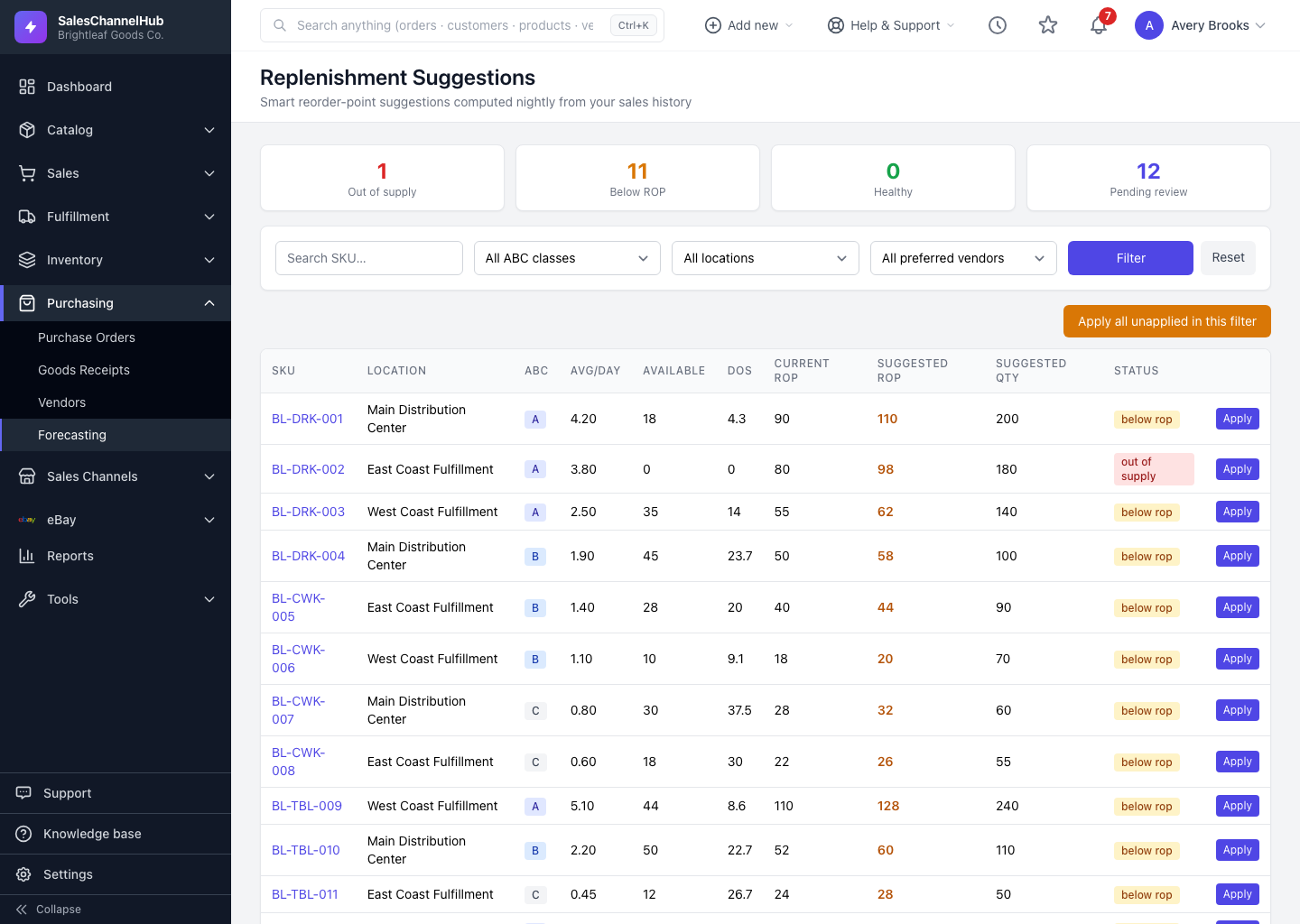
Forecasting watches what you actually sell and flags each SKU before it runs low. Every night it rolls up your paid orders, works out demand, and proposes a reorder point and reorder quantity per SKU. You review the list and apply what you agree with.
Where do I find it?
Open Purchasing → Replenishment Suggestions in the sidebar. There's no separate Forecasting index; the suggestions list is the home of the module, and the dials live under Settings → Forecasting.
How does it work, end to end?
- It reads your sales. Each night the system rolls up paid orders into a daily sales history per SKU and warehouse location.
- It measures demand. It averages units sold a day over a lookback window (90 days by default), counting no-sale days as zero.
- It ranks your SKUs. Items are graded into ABC classes by revenue, so your most important products carry more buffer stock.
- It suggests numbers. For every SKU and location it proposes a reorder point and reorder quantity, factoring in supplier lead time.
- You decide. Review the list and apply suggestions one at a time or in bulk.
Tip. Suggestions need a few weeks of sales history to be meaningful. A brand-new product won't appear until it has sold enough for the math to settle.
Was this article helpful?