Read the Replenishment Suggestions list
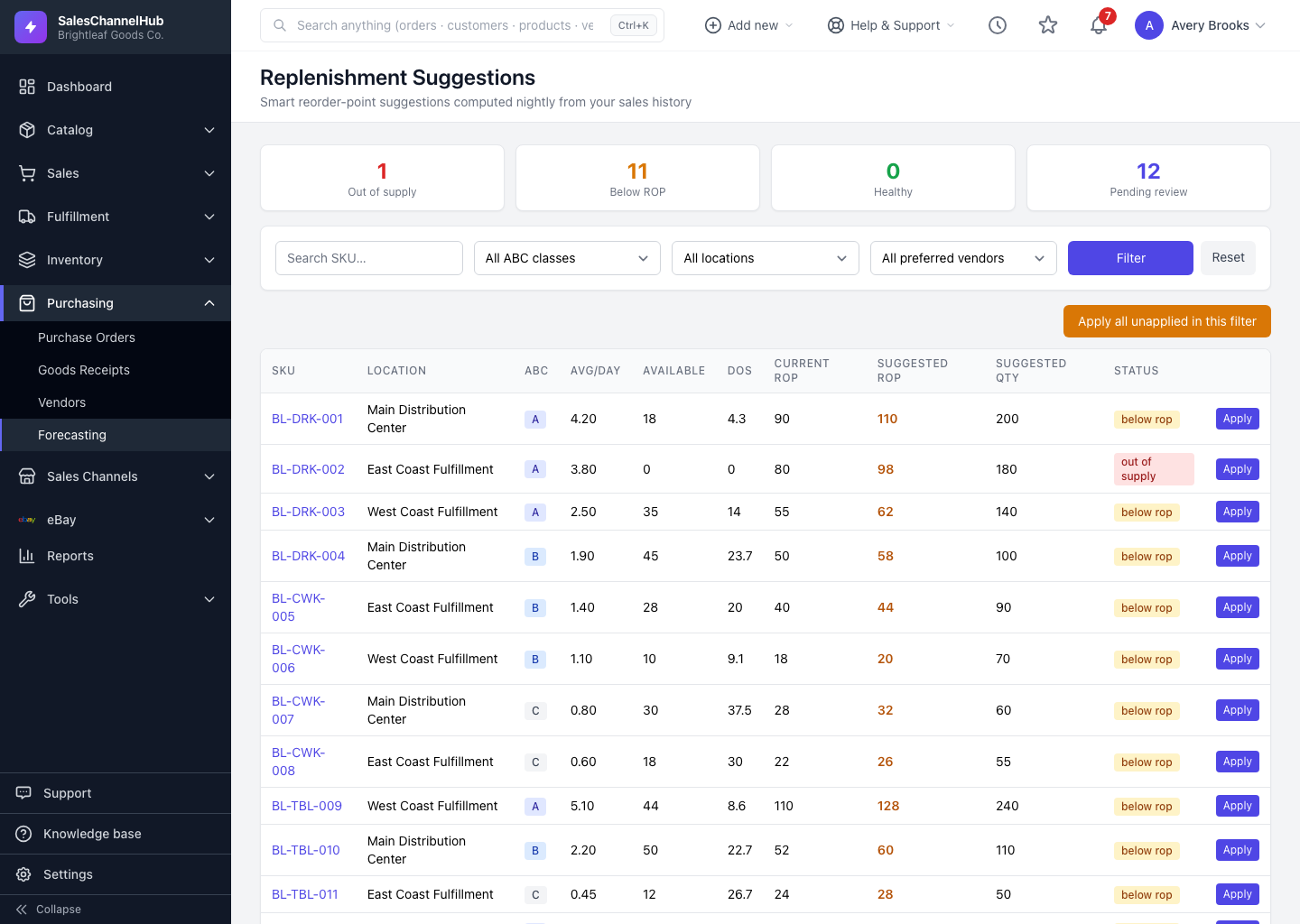
Open Purchasing → Replenishment Suggestions to see one row per SKU-and-location, with status tiles, filters and the full column set.
The Replenishment Suggestions screen is where you spend most of your forecasting time. Open it from Purchasing → Replenishment Suggestions. It lists one row per SKU-and-location pair with sales in your lookback window, refreshed nightly.
What do the status tiles mean?
- Out of supply: available quantity is zero or below. Order now.
- Below ROP: still in stock but at or under the suggested reorder point.
- Healthy: comfortably above the reorder point.
- Pending review: suggestions you haven't applied yet.
Click any tile to filter the table to just those rows.
What do the columns show?
- SKU and Location identify the item and warehouse.
- ABC is its revenue class (A, B or C).
- Avg/day is the forecast demand rate; Available is current sellable stock.
- DOS is days of supply left at that rate.
- Current ROP, Suggested ROP and Suggested Qty show what to change. A suggested ROP above the current one is highlighted.
- Status mirrors the tiles. Applied shows when you last accepted a suggestion.
Tip. Use the search box and the ABC, location and preferred-vendor filters to narrow a long list before applying anything in bulk.
Was this article helpful?