The shipment workspace
The shipment workspace is one screen for picking, packing and labelling paid orders. Open it from Shipments in the sidebar.
The shipment workspace is one screen for picking, packing and labelling every paid order, with no page reloads. Open it from Shipments in the sidebar, under the Fulfillment group.
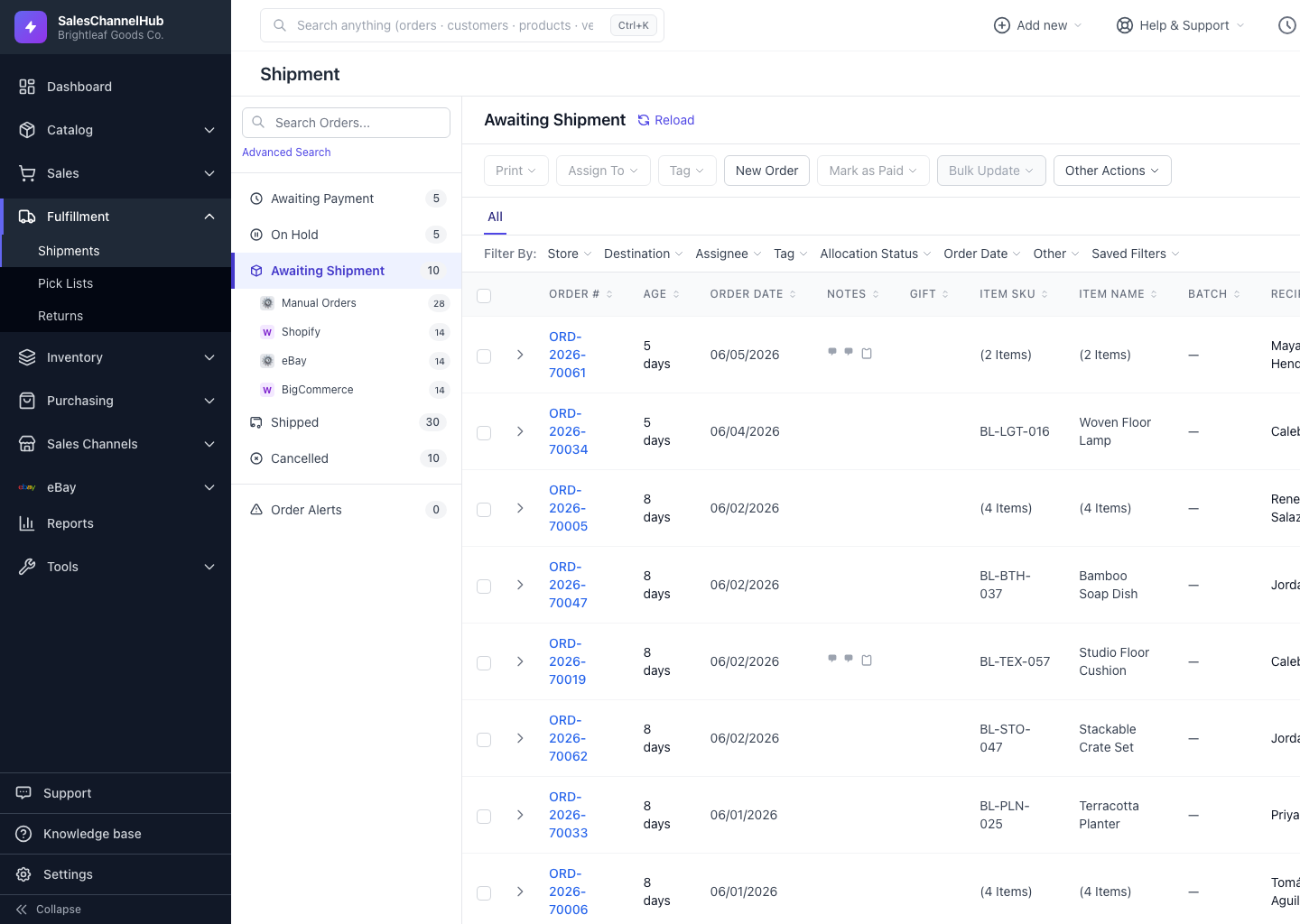
What are the main parts?
- Status sidebar — the buckets Awaiting Payment, On Hold, Awaiting Shipment, Shipped, Cancelled and Order Alerts, each with a live count, plus a Search Orders… box.
- Title bar — names the bucket you're in, with a Reload link to refresh the table.
- Action toolbar — bulk buttons such as Print, Assign To, Tag, New Order and Mark as Paid, plus an Other Actions menu.
- Filter bar — Filter By: Store, Destination, Assignee, Tag, Allocation Status, Order Date, Other and Saved Filters.
- Orders table — click any order number to slide up the workspace modal.
Tip. Bucket counts refresh on their own about every 60 seconds, and the poll pauses while the browser tab is hidden, so the numbers stay current without slowing the page.
Was this article helpful?