Shipment statuses and the sidebar
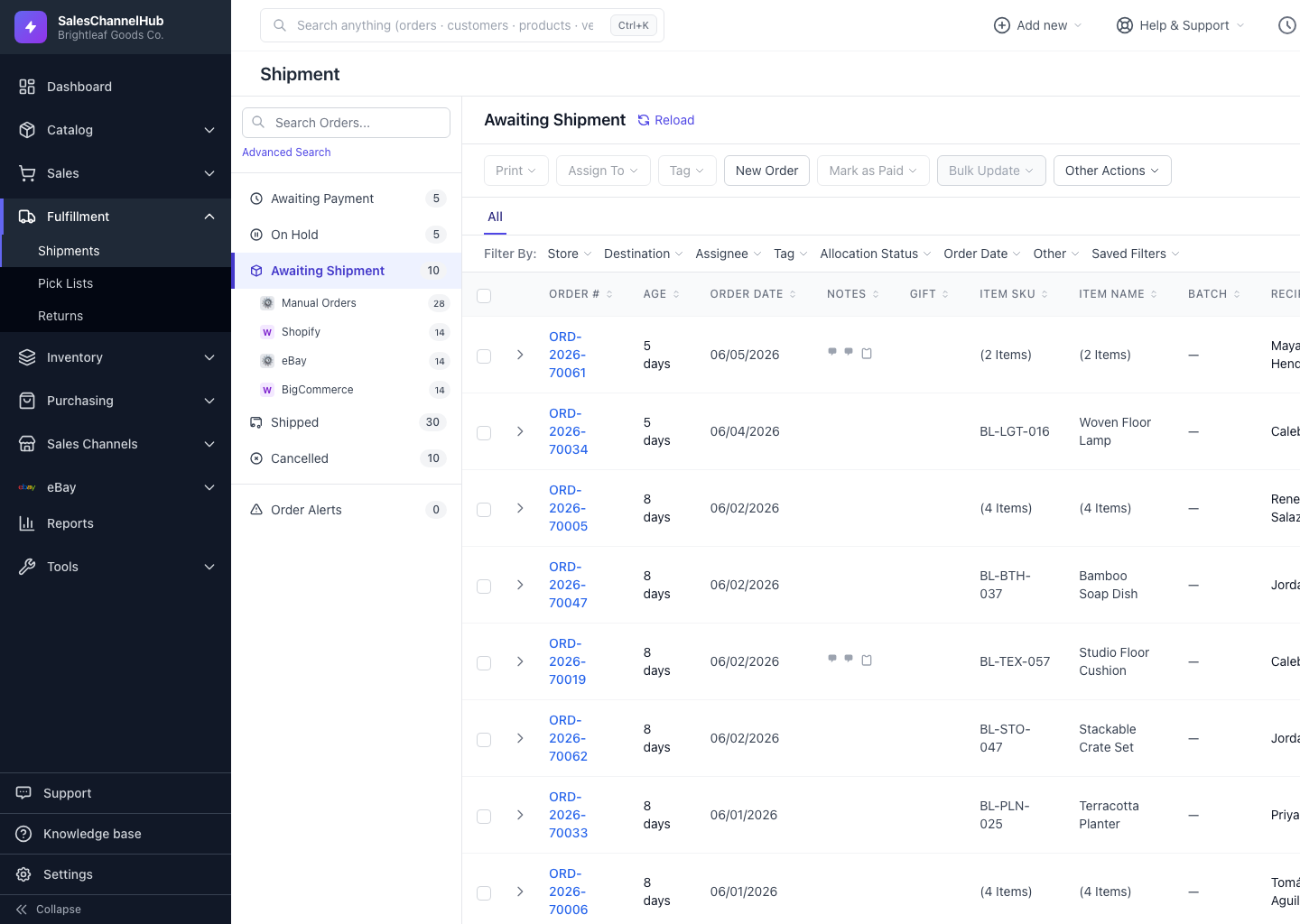
The sidebar groups orders into status buckets: Awaiting Payment, On Hold, Awaiting Shipment, Shipped, Cancelled and Order Alerts.
The status sidebar sorts every order into a bucket so you always know what to work next. Click a bucket to filter the table to just those orders.
What does each bucket mean?
- Awaiting Payment — the order arrived but isn't marked paid. You can't buy a label until it is.
- On Hold — held back, for example by a Hold Until date you set.
- Awaiting Shipment — paid and ready to pick, pack and label. This is your main work queue.
- Shipped — a label was bought or the order was marked shipped, with tracking attached.
- Cancelled — the order was cancelled and any active label voided.
- Order Alerts — orders that need a human decision, such as an address problem.
How do I narrow to one store?
Open a bucket and its connected stores appear nested beneath it. Click a store to see only that channel's orders within the bucket.
Tip. Start your day in Awaiting Shipment. That's the queue of orders you can label right now.
Was this article helpful?